

-
 Redaction
Mechanical keyboard switches: The complete guide
An exhaustive analysis of mechanical switch anatomy, actuation physics, and performance metrics for engineers and enthusiasts seeking technical precision.
The fundamental interface between human intent and digital execution in the computing world is the keyboard. While most consumer-grade hardware relies on inexpensive membrane layers, the mechanical keyboard sector has resurrected and refined the complex individual switch mechanisms that characterized early computing. A mechanical keyboard's functionality and user experience are primarily defined by its switches - the individual mechanisms beneath each keycap that register presses. These switches are distinct from the rubber dome technology found in membrane keyboards, offering a more tactile, customizable, and durable interaction.
Understanding switch types - linear, tactile, and clicky - is the single most important step in choosing a mechanical keyboard that matches your workflow, environment, and typing style.
The historical context of switch development
The history of mechanical switches dates back to the late 1970s and early 1980s, with IBM's buckling spring mechanism being a defining example of the era. Introduced in 1981 with the IBM Model F keyboard, the design was known for its durability and clicky feedback. These early systems utilized a physical spring that would buckle under pressure, causing an internal hammer to pivot toward a capacitive sensing plate - with the resulting change in capacitance, rather than physical contact, registering the keystroke. This provided a definitive tactile event and a sharp acoustic signature that remains a benchmark for feedback today.
The widespread popularity and standardization of mechanical switches came with the introduction of Cherry MX switches in 1983. The switch manufacturer Cherry - an American-founded company (established in Highland, Illinois in 1953) that expanded its keyboard and switch operations to Germany in 1967 - established the color-coded system still used today to identify various switch behaviors. This standardization allowed for a blooming ecosystem of aftermarket keycaps and standardized PCB (Printed Circuit Board) layouts, effectively moving mechanical keyboards from niche industrial tools to enthusiast hardware.
Anatomy of a mechanical switch
To understand why a keyboard feels the way it does, one must examine the internal geometry of the switch. Each mechanical switch comprises several key components that collectively determine its characteristics.
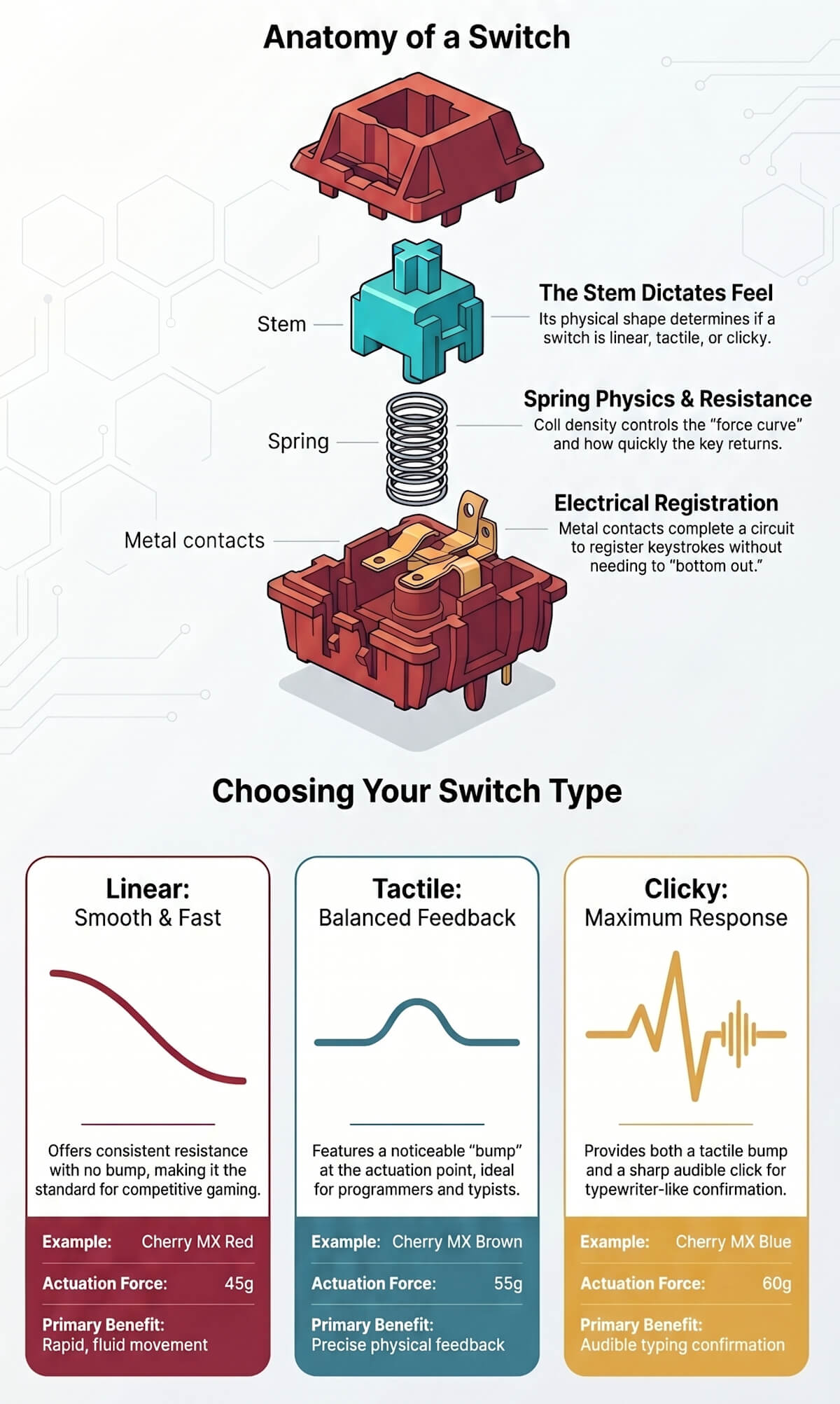
Stem and geometry
This is the central, moving part of the switch that the keycap mounts onto. Its design dictates the switch type - linear, tactile, or clicky - and influences actuation and travel distance, as well as the overall keystroke feel. The physical shape of the stem's "legs" interacts with the metal leaves inside the housing. In a linear switch, these legs are smooth. In tactile or clicky versions, the legs have a protrusion or "bump" that creates resistance at the actuation point.
Spring physics and resistance
Positioned beneath the stem, the spring is crucial for the typing experience, affecting actuation force and return speed. A stiffer spring requires more force to actuate the key. The material composition and coil density of the spring determine the "force curve." Some springs are progressive, becoming significantly harder to press as they approach the bottom of the stroke, while others maintain a more linear resistance profile.
Housing construction
A two-part construction comprising an upper and lower housing encases and protects the internal components. The upper housing guides the stem and secures the parts, while the lower housing holds the switch together and contains the metal contacts. Materials vary from polycarbonate to nylon or proprietary blends like POM (Polyoxymethylene). Nylon housings tend to produce a deeper, muted sound, whereas polycarbonate results in a higher-pitched "clack."
Electrical registration
Small metallic crosspoint contacts complete an electrical circuit when the key is pressed, sending a signal to the keyboard's controller and registering the keystroke. Precision in these contacts is vital to prevent "chatter," where a single press registers multiple times due to the metal vibrating as it connects. Cherry's gold-plated crosspoint contacts are a well-known engineering detail: gold resists oxidation and maintains consistent electrical conductivity across hundreds of millions of actuations.
Acoustic and friction management
In clicky switches, a distinct leaf mechanism or click-bar is responsible for producing the audible click sound. For those seeking a more refined experience, lubricant is often utilized. Some switches are pre-lubricated to reduce friction and noise, while enthusiasts may apply additional lubricant for a smoother feel and improved sound profile. Additionally, O-rings can be added to the stem to dampen the bottom-out sound, preventing the plastic-on-plastic impact at the end of a stroke.
Key characteristics and technical terminology
When evaluating switch performance, engineers and enthusiasts look at specific metrics that define the kinetic response of the device. These metrics allow for objective comparison between different switch models.
- Actuation force: The amount of pressure, typically measured in grams (g) or gram-force (gf), required to press a key and register a keystroke. Lighter switches (e.g., 35g-50g) are easier to press, while heavier switches (60g and above) offer more deliberate feedback and can help prevent accidental presses. The operating force is a term closely interchangeable with actuation force.
- Actuation point and distance: The specific distance the key must travel before the keystroke is registered by the computer. A shorter actuation distance (e.g., under 2mm) allows for quicker response times, often preferred by gamers, whereas a longer distance (e.g., over 2mm) requires a more deliberate press.
- Total travel distance: The full distance a key can be pressed down until it bottoms out. This is typically around 4mm for most mechanical switches, but can vary depending on the stem length and housing depth.
- Bottoming out: Occurs when a key is pressed all the way down until the keycap or stem hits the housing. Mechanical switches do not necessarily need to be bottomed out to actuate, unlike rubber dome keyboards. This allows for a lighter typing technique that can reduce fatigue over long sessions.
- Reset/release point: The distance at which the switch resets and can register a second press after being released. In clicky switches such as the Cherry MX Blue, this reset point sits slightly above the actuation point - a phenomenon known as hysteresis. This means rapid repeat-pressing requires the key to travel past the reset threshold before registering again, which is one reason clicky switches are considered less optimal for competitive gaming.
Linear switches: the speed standard
Linear switches provide a smooth, consistent keystroke throughout the entire travel, without any tactile bump or audible click. The force needed to push the switch remains constant from the top to the bottom of the stroke. Because there are no internal obstructions on the stem legs, these are generally the quietest mechanical switches available.
Linear switches are widely preferred by gamers for fast-paced competitive titles. The smooth action allows for rapid, fluid, and consistent key actuations, reducing reaction time and eliminating the mid-stroke resistance that can interrupt key sequences. They are also suitable for fast typists who prefer a "bottom-out" style of typing without interruptions.
Notable examples include the Cherry MX Red, which features an actuation force of 45g, a 2.0mm actuation distance, and a 4.0mm total travel - the most widely available linear switch across mainstream keyboards. For higher speeds, the Kailh Speed Silver offers an actuation force of 40g and a shortened 1.1mm actuation distance. Gateron Zero Degree 0° Silent switches offer a quiet linear experience with a 45g operating force, a 1.8mm actuation point, and a 3.6mm total travel, targeting office environments through an internal multi-pad dampening system rather than external foam. The Gateron Yellow (35g) is a perennial favorite for its exceptionally smooth travel at a low price point, and the Cherry MX Black (60g) appeals to typists with a heavier keystroke who prefer linear resistance without tactile interruption.
Best keyboards with linear switches


Tactile switches: the balanced approach
Tactile switches feature a noticeable bump partway through the keystroke. This provides physical feedback that the keypress has been registered, but without a loud click. The bump typically occurs at or near the actuation point, allowing the typist to feel exactly when the signal is sent.
These are considered versatile "do-it-all" switches, ideal for typing, programming, and general use due to the clear feedback without excessive noise. The feedback loop created by the tactile bump helps users develop a typing style that avoids bottoming out, which can potentially increase speed and decrease impact stress on fingers over long sessions.
The Cherry MX Brown is the world's most widely distributed tactile switch, with a 55g actuation force and a 2.0mm actuation distance. Its tactile bump is frequently described as subtle - a minor textural change in the downstroke rather than a sharp, pronounced event. Enthusiast alternatives like the Durock T1 and Gateron Baby Kangaroo V2 offer a far more pronounced and satisfying bump for those who find the Brown too gentle. The Zealios V2 by ZealPC remains one of the most celebrated high-end tactile options, known for its crisp, round bump and smooth return travel.
For quiet professional settings, the Kailh Silent Brown provides a 45g operating force and a standard 2mm actuation distance, combining tactile feedback with acoustic dampening.
Best keyboards with tactile switches


Clicky switches: maximum feedback
Clicky switches offer both a tactile bump and a distinct, audible click sound at the actuation point. This click is produced by a physical mechanism within the switch - often a click jacket engaging with the stem in traditional designs, or a metal click-bar snapping under load in more modern architectures.
Typists who enjoy the classic typewriter feel and audible confirmation of each keypress favor these switches. However, their loudness makes them unsuitable for shared workspaces. In an open-plan office, a clicky keyboard can be a significant distraction to colleagues.
The industry benchmark is the Cherry MX Blue, which has an operating force of 60g and an actuation distance of 2.2mm, with a 4.0mm total travel. As with all clicky switches, the MX Blue's reset point sits above the actuation point - the key must travel back past this threshold before a second press can register, which is why clicky switches are generally not recommended for rapid-fire competitive gaming.
For a sharper acoustic profile, the Kailh Box White uses a click-bar mechanism - a thin metal strip that snaps audibly on both the downstroke and the upstroke - producing a crisp, consistent click at every cycle, with an operating force of 45g. The box-style stem also provides additional resistance to dust and moisture. The Kailh Box Jade (50g) uses a thicker click-bar for a deeper, louder sound signature, popular with enthusiasts who want a more assertive acoustic profile.
Best keyboards with clicky switches


Switch lubing and modification
One of the most impactful - and often overlooked - aspects of the mechanical keyboard hobby is switch lubing. Applying a thin layer of lubricant to the internal stem, rails, and spring of a switch can dramatically transform its feel and sound profile.
Linear switches respond particularly well to lubing: a coating of a thicker grease (such as Krytox 205g0) applied to the stem legs, housing rails, and spring reduces friction noise and produces a "buttery" smoothness that even premium factory switches rarely match out of the box. Tactile switches require more restraint - lubricating the tactile legs of the stem will reduce or eliminate the bump, so the contact point is typically avoided. A thin coat of a lighter oil like Tribosys 3203 is the standard approach for tactiles.
Spring lubing - either by hand or via the "bag lube" method, where springs are placed in a bag with lubricant and shaken - eliminates the metallic "pinging" or "creaking" sound some springs produce. This is especially common with heavier springs above 65g.
For those not interested in hand-lubing every switch, many vendors and enthusiast group buys now offer factory-lubed variants. These are never quite equivalent to a careful hand lube job, but represent a substantial improvement over entirely dry switches at no additional effort.
Beyond lubing, switch films - thin polymer wafers inserted between the top and bottom housing halves - reduce stem wobble and tighten the housing tolerances on switches where the fit is looser than ideal. Popular films include those from Deskeys and Thicc films, and the audible tightening of the switch sound is often immediately apparent.
Form factors and keyboard sizing
Beyond switch type, the physical layout of a keyboard meaningfully shapes the typing experience, desk footprint, and portability. Keyboards are broadly categorized by the percentage of keys they retain relative to a standard full-size layout.
- Full-size (100%): Includes all standard keys, a numpad, and a function row. Ideal for data entry, accounting, or any workflow dependent on the numpad. The most complete and least portable layout.
- Tenkeyless (TKL / 80%): Removes the numpad while retaining all remaining standard keys, including the navigation cluster and function row. One of the most popular layouts, balancing functionality with a reduced footprint.
- 75%: Retains the function row and a compressed navigation column, eliminating the numpad. Keys are tightly packed with minimal bezel, significantly more compact than TKL while preserving most frequently used keys.
- 65%: Drops the function row but retains arrow keys and a small navigation cluster. Very popular in the enthusiast market as a practical compact format.
- 60%: Retains only the alphanumeric block, modifier keys, and punctuation. All other functions are accessed via a secondary function layer. Lightweight and portable, but requires keyboard-specific muscle memory.
- 40%: An extremely minimal layout used almost exclusively by enthusiasts. Number keys are absent. Extensive use of programmable layers is required and this format is not recommended for general-purpose use.
Form factor also intersects with mounting style, which directly affects typing sound and feel. A tray-mounted PCB - screwed directly to the case base - produces a stiffer, sharper keystroke and sound. A gasket-mounted design, where the PCB is suspended by silicone or foam gaskets around its perimeter, absorbs vibration and produces a softer, more cushioned typing feedback. The latter is a characteristic prized in the custom keyboard community and is increasingly common in mid-range and premium commercial boards.
The broader switch ecosystem
While Cherry MX remains the reference standard against which most switches are benchmarked, a diverse ecosystem of manufacturers has emerged, offering meaningful alternatives across quality tiers and price points.
Gateron (China) is widely regarded as producing smoother linear switches than Cherry out of the box, owing to tighter tolerances in their stem-to-housing fit. Their Yellow and Milky Yellow Pro variants are perennial favorites for budget and mid-range linear users. Gateron's more recent Dual Rail series - including the Zero Degree 0° - introduces engineering improvements targeting stability and silent operation.
Kailh (China) is particularly noted for innovation. Their Box switch line features a square stem housing that improves moisture resistance and reduces stem wobble. Kailh also produces the Speed series for shortened actuation and supplies OEM switches to major brands including Cooler Master and Razer.
Topre (Japan) occupies a unique position: their electrostatic capacitive switches combine a rubber dome above a coiled spring, with actuation triggered by a change in capacitance rather than physical contact - sharing the fundamental sensing principle of the original IBM Model F. While not "mechanical" in the traditional sense, they are universally discussed alongside premium mechanical keyboards. Their smooth, rounded tactile feel and distinctive sound signature have made the Topre Realforce and the Happy Hacking Keyboard (HHKB) objects of sustained enthusiasm.
ZealPC and boutique vendors such as Durock, Gazzew (Boba), and JWK produce premium switches targeted at the enthusiast market. These typically feature tighter manufacturing tolerances, specialty stem and housing materials, and unique tactile or linear profiles unavailable from mainstream suppliers. They are sold primarily through group buys or specialty vendors.
Advanced considerations and durability
Mechanical switches are known for their longevity, often rated for 50 million to 100 million keystrokes. This significantly exceeds the lifespan of membrane keyboards, which typically degrade after 5 to 10 million presses. This durability makes them a more sustainable long-term investment for high-volume users.
Hot-swappable keyboards have changed the market significantly by allowing users to replace switches without soldering. A hot-swap socket grips the switch pins mechanically, enabling removal and installation with a simple switch puller. Most modern enthusiast and mid-range boards now include hot-swap support as a standard feature, reflecting a broader shift toward modularity and repairability.
Optical mechanical switches use infrared light beams for actuation. When the stem descends, it interrupts a light beam, triggering the signal without any metal contact. This eliminates contact bounce and removes debounce delay from the equation, allowing near-instantaneous signal registration. Gateron, Razer, and others have adopted optical designs across their gaming-oriented lineups.
Electrostatic capacitive (EC) switches represent a premium alternative branch, using changes in capacitance to register a press - sharing the same fundamental sensing principle as the IBM Model F's buckling spring keyboard from 1981. Found in the Topre Realforce and HHKB product lines, these switches offer a uniquely smooth and durable typing experience. The combination of rubber dome resistance and progressive spring force produces a rounded tactile profile distinctly different from any traditional mechanical switch.
Analog hall-effect switches are the most recent technology entering mainstream commercial products. Using magnets and hall-effect sensors, these switches report the precise depth of each keystroke as an analog value rather than a binary on/off signal. Keyboards such as the Wooting 60HE use this approach to enable per-key adjustable actuation and rapid trigger features - allowing the keyboard to re-register a keypress before the key has fully reset to its resting position, a meaningful advantage in competitive gaming.
Trying switches before you buy
For new buyers, choosing a switch from a specification sheet alone can be frustrating. Switch testers - small boards containing one of each switch type - are widely available and offer an inexpensive way to develop real preferences before committing to a full keyboard. Most testers include 10-20 different switches from major manufacturers and cost less than the keyboard itself.
Many keyboard retailers, particularly specialty stores in North America, Europe, and Southeast Asia, also maintain physical demo units in-store. For online buyers, returnable hotswap keyboards present a practical alternative: buy a hotswap board, test several switch types across a few days, and settle on a final choice before the return window closes.
Community resources such as the r/mechanicalkeyboards subreddit, Geekhack forums, and Deskthority wiki contain thousands of first-hand switch reviews with consistent terminology, which are often more granular and context-specific than manufacturer marketing.
How to choose the right switch
No single switch category is objectively superior. The correct choice depends on workflow, environment, and personal preference.
For competitive gaming, linear switches with short actuation distances are the dominant choice. The Cherry MX Red, Gateron Yellow, or Kailh Speed Silver eliminate mid-stroke resistance and provide the lowest-friction actuation. Hall-effect analog switches are increasingly relevant for players who want per-key adjustable actuation or rapid trigger functionality.
For typing and programming, the decision typically comes down to how much feedback is wanted. Tactile switches - particularly the Cherry MX Brown, Durock T1, or Gateron Baby Kangaroo - provide confirmation of each keypress without noise. Enthusiasts who want more pronounced tactile clarity often gravitate toward high-bump switches such as the Holy Panda or Boba U4.
For shared workspaces and offices, silent switches are the practical choice. The Cherry MX Silent Red, Gateron Silent Yellow, and Gateron Zero Degree 0° offer near-membrane-level noise output while retaining the durability and feel advantages of mechanical construction.
For those new to mechanical keyboards, the Cherry MX Brown or Gateron Brown offer a safe, widely available starting point that works across typing and casual gaming. A hot-swappable board allows any initial switch choice to be revised later without replacing the keyboard itself.
Ultimately, the engineering that determines how a switch feels - spring weight, stem geometry, housing material, and contact design - remains the most critical factor in the hardware's long-term performance and satisfaction.
Share now









Key takeaways
- Mechanical switches use individual physical mechanisms under each key, unlike the uniform rubber dome layers found in membrane keyboards - this is what gives them their characteristic feel and longevity.
- Switches are categorized into three main archetypes: linear (smooth, no feedback), tactile (physical bump at actuation), and clicky (tactile bump plus audible click).
- Actuation force is measured in grams (g) or gram-force (gf) and is the primary metric for determining how much pressure a key requires. Typical ranges run from 35g (very light) to 80g+ (heavy).
- IBM introduced the buckling spring mechanism in the Model F keyboard in 1981, establishing an early benchmark for tactile and acoustic feedback. The design uses capacitive sensing - the hammer pivots toward a sensing plate and a change in capacitance registers the keystroke, with no physical electrical contact required.
- Cherry introduced the color-coded MX switch system in 1983, which remains the global industry standard for identifying switch behavior. Cherry was originally an American-founded company (established in Highland, Illinois, 1953) before expanding switch and keyboard manufacturing to Germany.
- The Cherry MX Brown is a tactile switch with a 55g actuation force - not 45g as sometimes misreported - and a 2.0mm actuation point.
- Modern mechanical switches are typically rated for 50 million to 100 million keystrokes, far exceeding membrane keyboards, which generally degrade after 5 to 10 million presses.
- Hot-swappable PCBs allow users to replace or upgrade switches without soldering, making them a recommended choice for anyone new to the hobby or undecided on switch preference.
- Optical mechanical switches use infrared light beams instead of metal contacts, eliminating contact bounce and debounce delay for near-instantaneous signal registration.
- Hall-effect analog switches (e.g., Wooting 60HE) use magnets and sensors to report keystroke depth as a continuous analog value, enabling features like per-key adjustable actuation points and rapid trigger - currently the leading technology for competitive gaming keyboards.
- Switch lubing - applying lubricant to a switch's stem, rails, and spring - is one of the most impactful modifications available, improving smoothness, reducing noise, and eliminating spring ping, particularly on linear switches.
- Switch films (thin polymer wafers inserted between housing halves) reduce stem wobble and tighten tolerances on switches with looser housings, visibly tightening the sound profile.
- Housing material meaningfully affects sound: nylon housings produce a deeper, muted tone, while polycarbonate housings result in a higher-pitched "clack."
- Gasket-mounted keyboards absorb vibration through silicone or foam gaskets around the PCB perimeter, producing a softer, more cushioned typing feel compared to tray-mounted designs.
- Switch testers - small boards with samples of multiple switch types - are an inexpensive and practical way to develop real preferences before purchasing a full keyboard.
Sources
- Corsair - Key switch types 101 https://www.corsair.com/us/en/explorer/gamer/keyboards/key-switch-types-101/
- Keychron - Types of keyboard switches https://www.keychron.com/blogs/news/types-of-keyboard-switches
- Cherry - MX switches at a glance https://www.cherry.de/en-gb/company/news/cherry-blog/article/cherry-mx-switches-at-a-glance
- Deskthority wiki - Cherry MX https://deskthority.net/wiki/Cherry_MX
- Deskthority wiki - IBM Model F https://deskthority.net/wiki/IBM_Model_F
- Wooting - Hall-effect and analog keyboard technology https://wooting.io/analog
- Topre - Realforce keyboard product information https://www.topre.co.jp/en/products/elec/keyboards.html
- Kailh - Box switch specifications and product range https://www.kailh.net/collections/box-switches
- Gateron - Switch product specifications https://en.gateron.com/collections/switches
- r/MechanicalKeyboards - Community switch reviews and buyer guides https://www.reddit.com/r/MechanicalKeyboards/wiki/switch_guides
- Published 2026-05-14 01:29
- Modified 2026-05-25 21:07

-
Redaction